



Parking Assist with Bike Rack

jreifler

Member
Joined
Aug 2, 2024
Messages
68
Media
11
Reaction score
72
Location
Memphis
Forgive what may be a ridiculous question, but is there a way to disable the rear parking assist / auto-brake when a hitch-mount bike rack is installed?

I drove with mine today and couldn’t get it to stop interfering in reverse. I had every driver assist option turned off, and also tried tow / haul mode. Interestingly, this didn’t happen with my trailer hooked up last weekend.

Surely, this can be disabled . . .
 
You can turn off the parking support brake with button to the left of the steering column. It has an icon of a car with a traffic cone behind it and a star above the cone.
Of course it’s that simple. Lol. Thank you !
 
  • Like
Reactions: JPE
Forgive what may be a ridiculous question, but is there a way to disable the rear parking assist / auto-brake when a hitch-mount bike rack is installed?

I drove with mine today and couldn’t get it to stop interfering in reverse. I had every driver assist option turned off, and also tried tow / haul mode. Interestingly, this didn’t happen with my trailer hooked up last weekend.

Surely, this can be disabled . . .
i have the same problom, i already close everthing, still auto brake....
 
您可以使用转向柱左侧的按钮关闭驻车辅助制动器。该按钮的图标是一辆汽车,后面有一个交通锥,锥上方有一颗星。
not working...still auto brake....
 
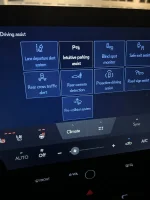
I had to turn off Obstacles Anticipation assist to turn off auto braking to hitch a trailer.
1725548230399.webp
 
I had to turn off Obstacles Anticipation assist to turn off auto braking to hitch a trailer. View attachment 3166
For me - I need to turn intuitive parking assist off on the main menu. Turning it off via the button to the left of the steering wheel only prevents braking.

Edit -came out this morning and it was auto-braking even with all of this turned off and the Parking Assist off. Frustrating.
 

Attachments

  • image.webp
    image.webp
    54.2 KB · Views: 511
Last edited:
Has anyone found a solution to this? I can’t even back out of my driveway. Ridiculous.
 
Has anyone found a solution to this? I can’t even back out of my driveway. Ridiculous.
This was the answer that worked for me:

"You can turn off the parking support brake with button to the left of the steering column. It has an icon of a car with a traffic cone behind it and a star above the cone."
 
This was the answer that worked for me:

"You can turn off the parking support brake with button to the left of the steering column. It has an icon of a car with a traffic cone behind it and a star above the cone."
Thank you so much! That worked!
 
Parking support brake button worked to stop the auto break, but the beeping obstacle alert from the back end keeps going off while I'm reversing down my driveway is driving me nuts, until I'm off the reverse gear. Also the side mirrors don't auto tilt down as I back up anymore, anyone have solutions for the last two items?
 
Parking support brake button worked to stop the auto break, but the beeping obstacle alert from the back end keeps going off while I'm reversing down my driveway is driving me nuts, until I'm off the reverse gear. Also the side mirrors don't auto tilt down as I back up anymore, anyone have solutions for the last two items?
Not sure how to disable the backup sensors. I expect there's a setting somewhere in the infotainment to do that. To get your mirrors to tilt down in reverse make sure that either the L or R mirror button on the driver's door has been pressed and has a green dot on it. I usually keep my R mirror with the green dot, that way if I touch the arrows on the driver's door the right outside mirror moves which I don't mind as much as the left mirror moving. To be honest though, I never accidentally touch the arrows on the door.
 

Users who are viewing this thread

Latest Discussions

GX550 Poll

  • Native glass and NO WPF - no cracks or chips in past 2 years.

    Votes: 2 20.0%
  • Native glass and NO WPF - no cracks or chips in past 1 year.

    Votes: 4 40.0%
  • WPF coated - no cracks or chips in past 2 years.

    Votes: 0 0.0%
  • WPF coated - no cracks or chips in past 1 year.

    Votes: 3 30.0%
  • WPF coated - mineral etching or scratches within first 3 months.

    Votes: 1 10.0%
  • WPF coated - mineral etching or scratches within > 6 months.

    Votes: 0 0.0%
Back
Top Bottom