
STARLINK ⭐️ - “should I stay or should I go”…. 🎵🎸 - plus mounting & wired vs wireless powering options

Emergencymed

Well-known member
🏆 GX of the Month
Joined
Mar 16, 2026
Messages
455
Media
245
Reaction score
469
Location
San Luis Obispo
PSA - Starlink Reminder:

SWITCH YOUR DEVICE TO STANDBY MODE, or discontinue service when your Starlink is not in use, in order to keep your starlink service but avoid the recurring cost of the lowest Starlink package: $55 - 100 GB / month for high speed satellite internet service.

FYI - I activated my Starlink service for two days for basic tasks (email, posts on the forum, annd texts) and my wife and I only used 14 GB of the 100 GB that was available. (7 GB per day).

If someone is new to mobile Satellite internet is interested in signing up for Starlink, and getting a discount (second month free) when signing up - my “referral” discount sign up link is :

Starlink

Standby mode continues to allow low speed satellite service at only $10 per month. Standby mode allows for basic text messages, Wi-Fi calls, software updates, and receiving two-factor authentication (2FA) codes. This is my current status following the San Juan Mountains excursion with NoNameX and DJsled.

The device costs $199 for Starlink Mini and there are multiple hook up and mounting options available. One drag is that powering the device when the Starlink Mini is externally mounted requires an open window in your vehicle to run the cable.
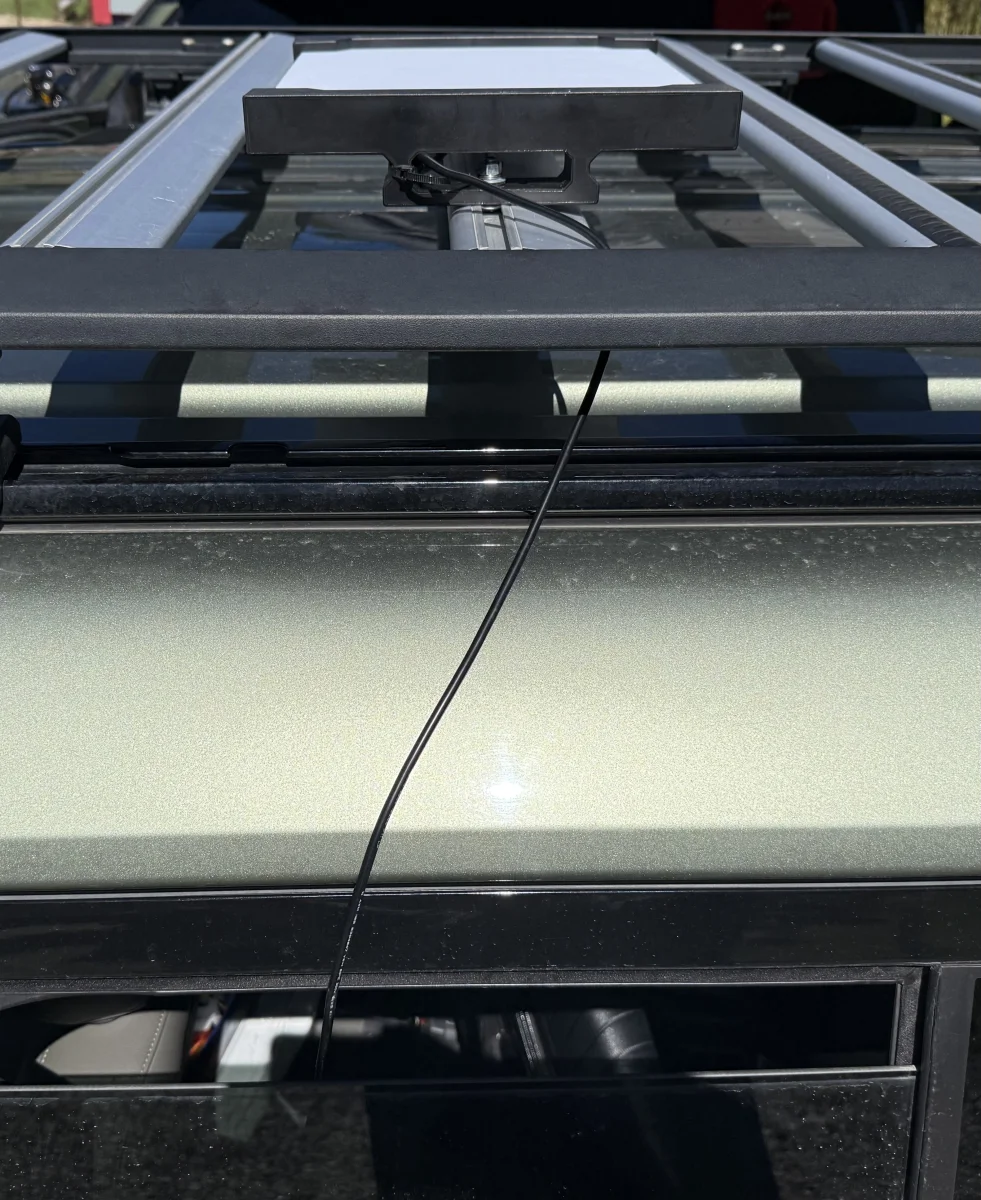
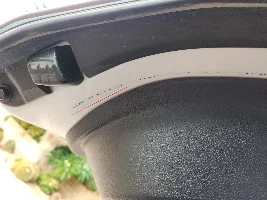
IMG_5021.webp


*** I would love to hear if someone on the forum has some way of mounting this thing without having to keep a window or sunroof open?

Since I’m a little nervous about someone stealing the Starlink Mini device off the top of my vehicle, my approach is to mount it only when needed.

A viable alternative is just to discontinue service and reactivate at a later time when it’s something you need for trips to remote locations where cell service is not available. I will affirm that the Starlink service came in clutch for us on this recent trip.

For me I rarely travel to remote locations for extended periods and need satellite service, so I’m on the fence.

My current thinking 🤔 mirrors the old Clash song 🎵 : “Should I stay or should I go??”
 
Last edited:
Yes, MKB - I bought one of those but I’m a little nervous about having a satellite dish just a few inches away from my head.. 🤔 .. so it stayed in the plastic..
 
My feeling is that if it can get signals from outer space, placing it on the roof 4 feet behind you isn’t gonna make too much of a difference. lol. Thats what I tell myself at least since I keep my cellphone in my pants pocket. 😜
 
So, I've doing some research as I am about to invest in a Starlink Mini... There is an integrated power system add on from PeakDo...


This would avoid external cables but not sure this would fit into roof rack mounts. I am still checking into this.
 
On my first trip I stuffed the Mini in between the moonroof and closed the window cover, no suction cups required. Ran the cord around the passenger visor, down the A-pillar and over to the cig plug. Worked great, just tight enough to stay put in there. Obviously it was secured in locked vehicle and out of view. But I didn't like the loose wires and power plug. Used a good smart 100 watt usb adapter.

This year I've been using a simple magnetic mount on roof, in front of shark fin. Cord runs though back hatch next to or through hinge. Weather striping handles it no problem. Once inside the cord goes behind the rear side panel up to the second row seat area where I have auxiliary power and fuse box. When I take the Mini off, I just stick most of cord behind the back panel. It's easy and quick. To date, the magnet mount passed 95+mph speed test and fast bumpy dirt roads no problem.

FYI, I've found when my phone (android) is connected to Starlink wifi I need to use a wired connection to car's data port for Android auto (music, maps, etc.) Also seems to require phone to be connected to Starlink wifi and data cable connected before starting car. Kind of a pain sometimes.

It will pull some power so an auxiliary battery is pretty much required if using for long periods while the car is off.

Hope that helps,
YMMV,
cheers,
Jim
 
Have Starlink at home & our lake house. Upgraded the home Starlink service to Residential Max to improve internet service, & Starlink sent a mini that stays idle. Think they charge $5 /mo to have it ready & waiting. We ‘re never going to use it going down the road, but will use it at games & glamping. Found a $25 Amazon bag for the Starlink antenna that is a nice custom fit. Portability allows to plug it in the back of LC’s 120v inverter when we stop. Coolest part is absolutely no aiming the antenna - just drop it down & it works.
 
Last edited:
On my first trip I stuffed the Mini in between the moonroof and closed the window cover, no suction cups required. Ran the cord around the passenger visor, down the A-pillar and over to the cig plug. Worked great, just tight enough to stay put in there. Obviously it was secured in locked vehicle and out of view. But I didn't like the loose wires and power plug. Used a good smart 100 watt usb adapter.

This year I've been using a simple magnetic mount on roof, in front of shark fin. Cord runs though back hatch next to or through hinge. Weather striping handles it no problem. Once inside the cord goes behind the rear side panel up to the second row seat area where I have auxiliary power and fuse box. When I take the Mini off, I just stick most of cord behind the back panel. It's easy and quick. To date, the magnet mount passed 95+mph speed test and fast bumpy dirt roads no problem.

FYI, I've found when my phone (android) is connected to Starlink wifi I need to use a wired connection to car's data port for Android auto (music, maps, etc.) Also seems to require phone to be connected to Starlink wifi and data cable connected before starting car. Kind of a pain sometimes.

It will pull some power so an auxiliary battery is pretty much required if using for long periods while the car is off.

Hope that helps,
YMMV,
cheers,
Jim
Great tip Jim !! I think I may look for a lockable mount and attach it permanently to the roof and run the cord as you describe.

Please send pics of exactly how you have routed your wiring .. it would be a benefit both to me and others who are exploring a similar install.
 
So, I've doing some research as I am about to invest in a Starlink Mini... There is an integrated power system add on from PeakDo...


This would avoid external cables but not sure this would fit into roof rack mounts. I am still checking into this.

Linkpower 3 - Impressive product - to power the Starlink mini wirelessly - 5.5 hours of use, no wires as Isjshrk mentioned and per this video IP65 rated so dust and water resistant 💦

Hmm 🤔
 
The one I used attached to my rental T rack but I had to find M8 carriage bolts to make it work because the t bolt had a base too wide to slide into the rack channel.


The suction cup version I found on Amazon was cheaply made and again didn’t feel comfortable with it directly over my head (few inches )

$11 - but can’t recommend it to everyone as I DID NOT test it out.. It would probably work fine and was inexpensive.

Suction cup Starlink mount: (not tested)


For now I have my Starlink Mini stored in this nice starlink mini storage box which is very sturdy and accomodates cigarette lighter charging cable worthwhile purchase IMHO.

Charging cable: (worked great):

Starlink Mini Car Adapter, 105W... Amazon.com


Starlink Storage case: (good quality):

Starlink Mini Case, Waterproof... Amazon.com

**** Another quick Starlink outside roof installation tip: just like taping in a chest tube, it’s a wise move to apply a “mesentery” of some type: for non-Medical people - an extra attachment point for the charging cable so it doesn’t pull out accidentally when you open the door and the cable is tugged. In my case I used a zip tie to hold the cable to the base with a short stretch of redundant cable closer to its attachment to the starlink.

Even with this counter measure, I ended up inadvertently pulling out the cable once when I opened the rear drivers side door.
 
Last edited:
This year I've been using a simple magnetic mount on roof, in front of shark fin. Cord runs though back hatch next to or through hinge. Weather striping handles it no problem. Once inside the cord goes behind the rear side panel up to the second row seat area where I have auxiliary power and fuse box. When I take the Mini off, I just stick most of cord behind the back panel. It's easy and quick. To date, the magnet mount passed 95+mph speed test and fast bumpy dirt roads no problem.
Would you mind sharing the name or link to your magnetic mount? I'm ordering a starlink this week.

I have no moonroof and I don't think I'll permanently mount it to my roof rack. I figure I'll just stick it on the truck when I'm camping, but keeping it mounted while moving around on a camping trip would be nice.
 
here's a link to a seersucker version that another user here used. Those suction cups are the real deal.

 
OK... here's the latest update. I purchased my Starlink Mini today. I also ordered the Peak Do integrated battery system that plugs directly into the bottom of the StarLink (see my comments above... I ordered the Gen 2 version since the Gen 3 seemed a waste.)

I found a company in Australia called Smart Touring Systems that emailed me back right away that their detachable mount will handle the Starlink Mini with the Peak Do power pack. I'm not sure yet when it arrives but, if successful, this will mean no power cords required. ... Will keep you all posted.
 
The Peakdo system is pretty slick. The wifi stuff on version #3 seems redundant and worthless but the extra half hour of run time might be worth the extra $20 ($249 for version #3 with 5.5 hrs of run time vs $229 for version #2 with 5 hrs run-time).
 
The Peakdo system is pretty slick. The wifi stuff on version #3 seems redundant and worthless but the extra half hour of run time might be worth the extra $20 ($249 for version #3 with 5.5 hrs of run time vs $229 for version #2 with 5 hrs run-time).
According to the review I attached earlier, the batteries in the V2 and V3 are identical. What they are claiming is that the V3 batteries are cherry picked (top 1%) from the rest. This may be a case of creative marketing... They are running a sale today so you can pick the V3 up for the same regular price of the V2.
 

Users who are viewing this thread

GX550 Poll

  • Yes, I can pick up in Los Angeles (Burbank area)

    Votes: 7 41.2%
  • Yes, but I need it shipped.

    Votes: 10 58.8%
Back
Top Bottom