🧑‍💻 GX550 Tech Tips and Tricks (5 Viewers)

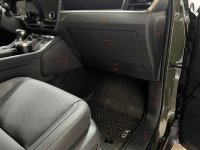
So I removed the glove box to see about gaining access to the sensor and I was able to. I pushed up on the sensor tabs with a long screw driver to pop it out of the dash to unplug. Here's a picture not the greatest but shows the connector looking between the airbag and dash brace above the a/c duct tube. Not gonna be easy if to plug it back in, but I'll worry about that later. View attachment 17302
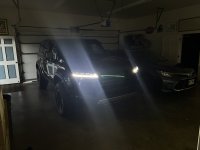
So now you can stay in Auto with just DRL on as long as you want, right? No matter how dark
 

Attachments

  • IMG_4324.JPG
    IMG_4324.JPG
    153 KB · Views: 102
Perfect. How hard was it to remove glove box and get to that sensor 1-10?
Its easy to remove. Here's a picture i numbered on what has to come off. Everything is held on with clips with the exception of the knee airbag which has 3 10mm bolts and 3 tabs on the top edge below the glove box. Glove box has 4 screws. Dont unplug the airbag thought just set it on the carpet once its unbolted.
 

Attachments

  • IMG_4330.JPG
    IMG_4330.JPG
    348.9 KB · Views: 91
Its easy to remove. Here's a picture i numbered on what has to come off. Everything is held on with clips with the exception of the knee airbag which has 3 10mm bolts and 3 tabs on the top edge below the glove box. Glove box has 4 screws. Dont unplug the airbag thought just set it on the carpet once its unbolted.
Oh damn thats way more than I expected. Think there’s a fuse one could pull that only connects to that sensor? I remember pulling a fuse to cut the power to the DRL in my old Civic Si. Could it be that simple?
 
Last edited:
Hey everyone,

I'm having trouble with the seat memory function. Hit Set and hold 1 till beep, then do the same for 2. Then Press 1 and nothing happens. Held Set and repeated. Whatever I do, it doesn't remember my choice. yes I read the manual and watch YT videos. I know I must be doing something wrong but don't know what.

Ha - Page 1 - my seat beeps. So I need to calibrate it.
 
Last edited:
Even though I disabled the driver monitoring, I still get this message popping up from time to time when my arm blocks the sensors. Anyone else have this problem?
20251216_155451.jpg
 
Yes. To my knowledge, the driver monitor is always enabled. Turning off the feature in the infotainment simply silences the "driver inattention detected" alerts. When it can't see your face, it will still pop that message up.

I think some members simply put electrical tape over the sensor. Be warned, though - I think that disables Traffic Jam Assist.
 
Here is a small tech idea that I thought I would share. I added a phone mount on the center console in front of the cup holders, and I use a 90 degree usb c adapter with a short cable that has a 90 degree sideways adapter to plug into my phone. That keeps my phone secured and charging without getting in the way.
What brand of mount did you use?
 
Hey everyone,

I'm having trouble with the seat memory function. Hit Set and hold 1 till beep, then do the same for 2. Then Press 1 and nothing happens. Held Set and repeated. Whatever I do, it doesn't remember my choice. yes I read the manual and watch YT videos. I know I must be doing something wrong but don't know what.

Ha - Page 1 - my seat beeps. So I need to calibrate it.
I had this issue. It was very confusing. I found a video on YouTube where a dealer showed you needed to move the seat all the way forward and then all the way back, before trying to set the memory position and that did it for me. Seemed like a calibration step.
 

Users who are viewing this thread

Latest Discussions

GX550 Poll

  • RRW RG3-H Hybrid

    Votes: 7 77.8%
  • Fifteen52 Analog HD

    Votes: 1 11.1%
  • Nomad 504 Field?

    Votes: 1 11.1%
Back
Top