


PSA - Starlink Reminder:
SWITCH YOUR DEVICE TO STANDBY MODE, or discontinue service when your Starlink is not in use, in order to keep your starlink service but avoid the recurring cost of the lowest Starlink package: $55 - 300 GB / month for high speed satellite internet service.
FYI - I activated my Starlink service for two days for basic tasks (email, posts on the forum, annd texts) and my wife and I only used 14 GB of the 300 GB that was available. (7 GB per day).
If someone is new to mobile Satellite internet is interested in signing up for Starlink, and getting a discount (second month free) when signing up - my “referral” discount sign up link is :
Starlink
Standby mode continues to allow low speed satellite service at only $10 per month. Standby mode allows for basic text messages, Wi-Fi calls, software updates, and receiving two-factor authentication (2FA) codes. This is my current status following the San Juan Mountains excursion with NoNameX and DJsled.
The device costs $199 for Starlink Mini and there are multiple hook up and mounting options available. One drag is that powering the device when the Starlink Mini is externally mounted requires an open window in your vehicle to run the cable.
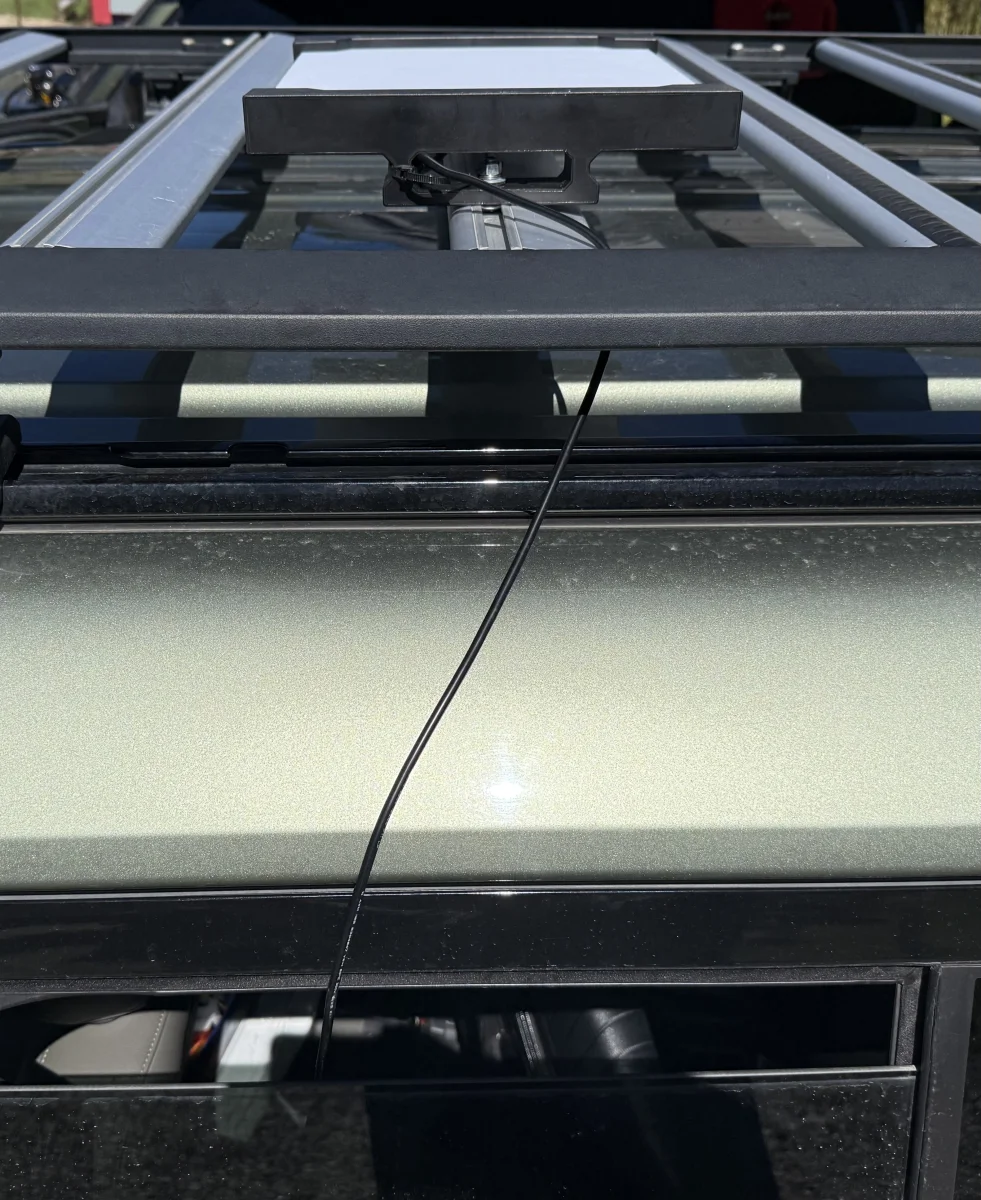
*** I would love to hear if someone on the forum has some way of mounting this thing without having to keep a window or sunroof open?
Since I’m a little nervous about someone stealing the Starlink Mini device off the top of my vehicle, my approach is to mount it only when needed.
A viable alternative is just to discontinue service and reactivate at a later time when it’s something you need for trips to remote locations where cell service is not available. I will affirm that the Starlink service came in clutch for us on this recent trip.
For me I rarely travel to remote locations for extended periods and need satellite service, so I’m on the fence.
My current thinking mirrors the old Clash song
  : “Should I stay or should I go??”
SWITCH YOUR DEVICE TO STANDBY MODE, or discontinue service when your Starlink is not in use, in order to keep your starlink service but avoid the recurring cost of the lowest Starlink package: $55 - 300 GB / month for high speed satellite internet service.
FYI - I activated my Starlink service for two days for basic tasks (email, posts on the forum, annd texts) and my wife and I only used 14 GB of the 300 GB that was available. (7 GB per day).
If someone is new to mobile Satellite internet is interested in signing up for Starlink, and getting a discount (second month free) when signing up - my “referral” discount sign up link is :
Starlink
Standby mode continues to allow low speed satellite service at only $10 per month. Standby mode allows for basic text messages, Wi-Fi calls, software updates, and receiving two-factor authentication (2FA) codes. This is my current status following the San Juan Mountains excursion with NoNameX and DJsled.
The device costs $199 for Starlink Mini and there are multiple hook up and mounting options available. One drag is that powering the device when the Starlink Mini is externally mounted requires an open window in your vehicle to run the cable.
*** I would love to hear if someone on the forum has some way of mounting this thing without having to keep a window or sunroof open?
Since I’m a little nervous about someone stealing the Starlink Mini device off the top of my vehicle, my approach is to mount it only when needed.
A viable alternative is just to discontinue service and reactivate at a later time when it’s something you need for trips to remote locations where cell service is not available. I will affirm that the Starlink service came in clutch for us on this recent trip.
For me I rarely travel to remote locations for extended periods and need satellite service, so I’m on the fence.
My current thinking
mirrors the old Clash song : “Should I stay or should I go??”

 ..
..


 …
…