OEM+ DASHCAM BY FITCAMX REVIEW

not the place for sales but, someone interested might be reading the thread so.....I have a unit to sell I decided not to install. BNIB If anyone is looking
 
@Zaki6 Yes, I've found that to be the case as well. For some reason I don't quite understand, the GX550 has to connect to the FITCAMX as WiFi and that action doesn't allow the GX550 to load CarPlay via Bluetooth. However, if you plug your phone in via USB cable you can have both the FITCAMX camera and CarPlay, so that's what I do now.

I also thought that since I didn't renew my vehicle based AT&T WiFi service, that may have been the issue, but no. I renewed that AT&T service and the GX still can't load CarPlay without the USB cord while the camera is functioning. Can someone explain why that is to me?

I received this very useful response from FITCAMX today:
IMG_8430.webp
 
not the place for sales but, someone interested might be reading the thread so.....I have a unit to sell I decided not to install. BNIB If anyone is looking
What happen ? Are you going with a different dash cam ?
 
I got my dash cam finally installed. I got a few issues ...

I modified the plug and play harness to use the hardwire kit so I have the parking mode. Does anyone have parking mode setup? I noticed that it is saving files in the locked folder. It might be due to the way I wired that parking wire, just need someone to confirm for me.

I pressed the snapshot button while witnessing a near miss in front of me. I figured I would mark the timestamp of that picture and then find the video ... However there was nothing saved and recorded during that time. It was the only time missing during a 4hr drive. Can someone test that out?

The CarPlay not connecting is extremely annoying. I read everything in the thread prior and understand you can't leave the camera wifi on auto-join. Every time I try to connect my phone through the car, it says car play error. I had to fully disconnect the phone and add it as a new device. I'm sure the next time I connect to the camera it will give me the same issues again.
 
I got my dash cam finally installed. I got a few issues ...

I modified the plug and play harness to use the hardwire kit so I have the parking mode. Does anyone have parking mode setup? I noticed that it is saving files in the locked folder. It might be due to the way I wired that parking wire, just need someone to confirm for me.

I pressed the snapshot button while witnessing a near miss in front of me. I figured I would mark the timestamp of that picture and then find the video ... However there was nothing saved and recorded during that time. It was the only time missing during a 4hr drive. Can someone test that out?

The CarPlay not connecting is extremely annoying. I read everything in the thread prior and understand you can't leave the camera wifi on auto-join. Every time I try to connect my phone through the car, it says car play error. I had to fully disconnect the phone and add it as a new device. I'm sure the next time I connect to the camera it will give me the same issues again.
Not sure if anyone did the parking mode on the install , we only use the plug and play for Ignition ON recording only.

As for the accessing the camera , I would turn off my Bluetooth on my phone then access the app using WiFi only with no interruption and after I’m done downloading my files I need , i close the app and turn on Bluetooth back.

I don’t really have a reason to connect the phone to the dash cam at all times .
 
I emailed Fitcam and they confirmed that parking videos will be saved in the locked folder. Not sure why they included a parking folder if it never gets used. I will do some more test of the videos and post a video of how I modified the harness to make everything work and wired from the mirror area.
 
I emailed Fitcam and they confirmed that parking videos will be saved in the locked folder. Not sure why they included a parking folder if it never gets used. I will do some more test of the videos and post a video of how I modified the harness to make everything work and wired from the mirror area.
Sounds good 👍
 
So from what I am gathering from the Fitmax cam is that wireless carplay really does not work with the camera installed.

You would have to use carplay with physically plugging the phone in, correct?

TIA
 
That's been my experience, yes. But others may have figured it out better than I.
 
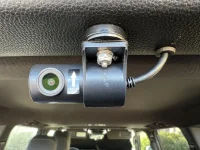
However, the FITCAMX fits better than all other dash cams, including the Toyota OEM dash cam system, and looks perfectly integrated into the rear-view mirror base. The rear camera is a bit obtrusive, but it's worth dealing with that to have the rear-view protection.
 
I'm not a big tech guy but you may want to give this a try. Set up your camera with your phone to the settings you want (ie length of clips, mute microphone, etc) Then go into your phone settings "wifi" forget this network. This will allow your CarPlay to have wireless priority. I believe the camera will keep all the settings you programmed. You can remove the sd card from the camera and download the files to your computer or reestablish the wifi network connection on your phone as needed for downloads. I found since I have installed my camera in the car I have not used the app. You will need your password when you reestablish the wifi connection.
 
Last edited:
So from what I am gathering from the Fitmax cam is that wireless carplay really does not work with the camera installed.

You would have to use carplay with physically plugging the phone in, correct?

TIA
That’s not exactly what they are saying. You just can’t have both connected at once. So connect to camera, get it setup like you want and then tell you phone to forget that WiFi device. If you ever need to look at a video for some reason you can pull the SD card or connect your phone again and download the video and then tell phone to forget the device.

For me personally the only time I’m going to look at the videos is if something happens and I need one. I may connect from time to time just to make sure it is recording but I don’t need real time access from my phone so the way this works is not a big deal to me.
 
Here you go guys hopefully this helps on how to install the rear camera , remember to use my discount code : save10withk1 for 10% off + free shipping


This is SUPER helpful.. Thanks so much for taking the time to record and share your expertise!
 
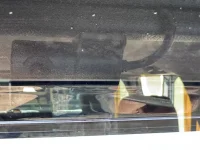
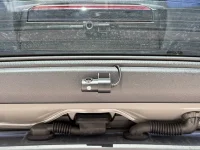
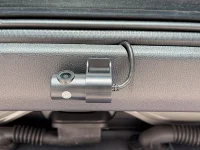
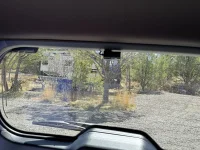
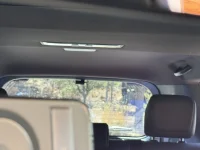
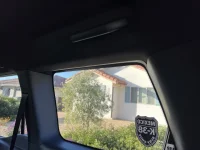
FWIW, a few mediocre pics of how my rear cam looks.
One thing I wish is that both front, rear cams had a built in tiny flashing red light (powered by whatever means) when the car is parked and off (even though mine doesn’t have the parking mode). Basically a fake security warning..
 

Attachments

  • IMG_8644.webp
    IMG_8644.webp
    158.9 KB · Views: 228
  • IMG_8642.webp
    IMG_8642.webp
    379 KB · Views: 231
  • IMG_8641.webp
    IMG_8641.webp
    349.2 KB · Views: 212
  • IMG_8640.webp
    IMG_8640.webp
    415 KB · Views: 224
  • IMG_8639.webp
    IMG_8639.webp
    118.2 KB · Views: 229
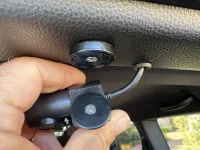
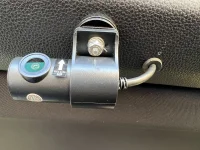
K1autogx550 recommended using magnets, so I ordered these neodymium magnets to attach the rear-facing camera from Amazon. These magnets come with matching steel washers, and both have tapered holes so that small cone headed screws can be used to flush mount them both to the trim and camera. I put the washer on the camera and the magnet on the trim. I also drilled a hole exactly big enough for the larger end of the rear camera cord to fit through the trim piece, and stretched a grommet over the cord, and then stuffed the grommet into that hole for a clean install. The magnets have an "80" lb hold (really?) but they do hold very well. Like they're welded together and the camera does not move. But it can still be dis-attached (with significant effort) and adjusted as needed.

This is SUPER helpful..
One suggestion @BriC-622, I K1autogx550 shows in his video that the wire between the rear and front camera is too long, so it has a lot of slack. I found that putting that extra slack wire above either of the two passenger side doors was challenging, as there seemed to be a lot of vehicle wiring in the roof (airbags?) so I found that stuffing all that extra wire slack into the headliner above the rear window (IMG_4709) was pretty easy. Clear as mud?
 

Attachments

  • IMG_4707.webp
    IMG_4707.webp
    216.3 KB · Views: 217
  • IMG_4708.webp
    IMG_4708.webp
    386.6 KB · Views: 208
  • IMG_4706.webp
    IMG_4706.webp
    264.8 KB · Views: 209
  • IMG_4709.webp
    IMG_4709.webp
    134.7 KB · Views: 211
I almost went that route too.. But wanted to try using super strong nano tape first. That’s what my installer did for me using tape similar to this pic. It’s been 2 months now..the rear cam has never loosened.
Be careful how much of this type tape you use! It’s a bear to remove or loosen; it hardens up extremely well over time! It held a license plate on my old Sequoia for 3 years directly on the front plastic bumper. I worked for like 3+ hrs to get it off in preparation for trade-in for the GX. 😳

1744211116345.webp
 

Users who are viewing this thread

Sponsored Vendors View all →

GX550 Poll

  • OEM Lexus

  • WeatherTech

  • Other (specify below)


Results are only viewable after voting.
Back
Top Bottom